The Best Marketing Tech Stack for Every Stage of Growth

Updated: Jul 28
Specific martech tools, integrations and agentic workflows for startups and growing businesses
Recommendations last reviewed: 27 July 2026

Most guides to building a marketing tech stack offer perfectly sensible advice.
Start with your strategy. Map the customer journey. Identify your requirements. Check which tools integrate. Consider your budget. Avoid buying software you do not need.
All of that is correct.
But it still leaves you with the difficult question:
Which marketing technology should you actually use?
The 2026 Marketing Technology Landscape contains 15,505 products. Although the total has almost stopped growing, the apparent stability hides considerable change: 1,488 products were added during the year and 1,367 were removed.
Faced with that amount of choice, businesses often end up in one of two positions:
They delay decisions because they cannot confidently compare the options.
They gradually accumulate a collection of disconnected platforms, subscriptions and spreadsheets.
This guide takes a more opinionated approach.
Based on our experience supporting startups, SMEs and growing marketing teams, it shows:
The marketing tech stack we would recommend at each stage of growth
The specific tools we would normally choose
When we would recommend an alternative
How the platforms should integrate
What the stack should be able to automate
Where AI agents can perform useful work
Which decisions should remain under human control
When a business is likely to outgrow its current setup
These are not the only viable stacks.
Your business model, customer journey, sales process, team, budget and existing technology all matter. An ecommerce company needs a different marketing technology stack from a B2B consultancy or product-led SaaS platform.
But if you are starting with a relatively blank sheet of paper, these are the stacks we would use as the default starting point.
The recommended marketing tech stacks at a glance

Stage one: Founder-led or validating the business
A lean service or B2B stack:
Website: Wix
CRM and forms: HubSpot Free
Analytics: Google Analytics 4
Organic search data: Google Search Console
Behavioural analytics: Microsoft Clarity
Scheduling: Calendly
Design: Canva
SEO: Ahrefs Free or Starter
AI workspace: Claude Pro
Workflow automation: Make, used selectively
Marketing-data access for AI: Catchr Starter once several channels justify it
Indicative software budget: approximately £50–£250 per month.
For ecommerce, replace Wix and HubSpot with Shopify and initially use Shopify’s built-in customer and marketing features.
Stage two: Building repeatable acquisition
A typical B2B or lead-generation stack:
Website: Retain Wix, WordPress or Webflow
CRM and marketing: HubSpot Starter
Alternative lifecycle platform: ActiveCampaign
Analytics and tagging: GA4 and Google Tag Manager
Organic and AI-search visibility: Google Search Console and Ahrefs
Behavioural analytics: Microsoft Clarity
Reporting: Looker Studio
AI workspace: Claude Team
Marketing-data layer: Catchr Starter
Agentic workflow orchestration: Make AI Agents
Creative production: Canva Pro
Indicative software budget: approximately £250–£1,000 per month.
For ecommerce, the core would normally be Shopify and Klaviyo rather than HubSpot.
Stage three: Growing through multiple channels
A typical B2B stack:
CRM and marketing automation: HubSpot Professional
Analytics and tagging: GA4 and Google Tag Manager
Reporting: Looker Studio or Power BI
Marketing-data access: Catchr Growth
Data warehouse: BigQuery where justified
SEO and AI-search monitoring: Ahrefs or Semrush
Behavioural analytics: Microsoft Clarity
Experimentation: VWO when traffic justifies it
Product analytics for SaaS: PostHog or Mixpanel
AI workspace: Claude Team or Enterprise
Workflow and agent orchestration: Make Teams or n8n
Indicative software budget: approximately £1,000–£5,000 or more per month.
Not every business at this stage needs every tool listed. Each platform should solve an established commercial or operational problem.
Stage four: Scaling or operationally complex organisation
There is no responsible universal stack at this stage.
A typical marketing technology architecture might include:
HubSpot Enterprise or Salesforce
HubSpot, Adobe Marketo Engage or another advanced marketing automation platform
BigQuery, Snowflake or another data warehouse
Segment or another customer data platform
Looker or Power BI
Workato, Make, n8n or enterprise integration infrastructure
VWO or Optimizely
A governed AI environment
Specialist agents with tightly controlled data and system access
At this stage, architecture, governance and implementation matter more than selecting the most popular individual products.
What is a marketing tech stack?
A marketing technology stack—often shortened to marketing tech stack or martech stack—is the collection of technology a business uses to plan, execute, automate, measure and improve its marketing.
Depending on the organisation, a marketing technology stack can include tools for:
Managing the website
Capturing enquiries
Storing customer and prospect data
Sending marketing communications
Managing sales opportunities
Publishing and optimising content
Running advertising
Measuring performance
Understanding website and product behaviour
Personalising customer experiences
Connecting separate systems
Automating repetitive processes
Providing AI assistants and agents with data, context and tools
The word “stack” can be slightly misleading.
It suggests a neat collection of technologies placed one on top of another. In practice, a modern marketing stack is an interconnected ecosystem.
Information needs to move between its components. The value of each platform often depends on the quality of those connections.
A sophisticated email platform is of limited value when customer data is incomplete. An analytics platform cannot provide reliable answers when conversion tracking is broken. A powerful CRM will not help when nobody consistently updates it.
The best integrated marketing technology stack is therefore not necessarily the one containing the most advanced tools.
It is the one in which:
Every tool has a clearly defined purpose.
Information moves reliably between systems.
The team understands how to use it.
Important data has a clear system of record.
The cost and complexity are appropriate for the business.
Automation is used for predictable processes.
AI agents are used where interpretation is genuinely required.
Human responsibility remains clear.
The stack produces information or action that contributes to growth.
A modern marketing technology stack has five layers
Traditional martech diagrams tend to show a collection of software categories.
A modern stack needs to show something else: how data, systems, automation, AI and people work together.
We divide the stack into five layers.

1. Systems of record
These are the platforms that hold the authoritative version of important business information.
Examples include:
A CRM such as HubSpot or Salesforce
An ecommerce platform such as Shopify
A lifecycle platform such as Klaviyo
A subscription or payment platform
A product database
A customer support platform
A data warehouse
You should know which system owns each important type of information.
For example:
Where is the definitive customer record?
Where is consent stored?
Which system determines whether someone is a customer?
Where is revenue recorded?
Which platform owns product and pricing information?
Where is the agreed acquisition source stored?
AI should not become an unofficial second database containing inconsistent copies of customer information.
2. Acquisition and customer-experience tools
These are the platforms through which people discover and interact with the business.
They may include:
Website and CMS
Advertising platforms
Search and AI-visibility tools
Email marketing
Social media
Landing pages
Forms
Scheduling
Webinars
Customer service
Product experiences
The correct selection depends more on the business model and customer journey than on the size of the company.
3. Data and context
This layer helps people and AI systems understand what is happening and how the business expects work to be completed.
It may contain:
GA4
Google Search Console
Catchr
CRM data
Marketing targets
Customer research
Brand guidelines
Product information
Campaign history
Reporting definitions
Approved claims
Previous experiments
Standard operating procedures
AI can generate output without this context.
It cannot reliably make good marketing decisions without it.
4. Automation and agent orchestration
This is the layer that moves information and work between systems.
Tools such as Make and n8n can:
Trigger workflows
Retrieve information
Transform data
Call AI models
Give agents access to approved tools
Update CRMs
Create tasks
Generate documents
Request human approval
Record the result of each workflow
Make’s current AI Agent product allows users to provide an agent with instructions, knowledge, application tools and third-party MCP connections. It remains in open beta, so its functionality and pricing may change.
n8n is a more technically oriented alternative that combines deterministic workflow steps, AI agents, human approvals and code. It is available as a hosted service and through self-hosted options.
5. Human control and accountability
People should continue to set:
Objectives
Commercial priorities
Brand standards
Permissions
Success criteria
Approval thresholds
Escalation rules
Actions an agent may never perform autonomously
Responsibility when something goes wrong
Human involvement is not a temporary limitation that will disappear as AI improves.
It is part of a well-designed marketing operating system.
Use the smallest stack capable of supporting your next stage
Businesses often associate maturity with having more technology.
A new requirement appears, so another platform is purchased. Someone wants a different report, so another dashboard is created. A team wants to automate one task, so another subscription is added.
Over time, the stack becomes larger without necessarily becoming more capable.
Our preferred approach is:
Build the smallest integrated marketing technology stack capable of supporting your current growth model and foreseeable next stage.
“Foreseeable” is important.
You should not choose a platform that you will obviously need to replace within three months.
Equally, you should not pay for enterprise functionality because you hope to require it in three years.
A good martech stack should sit slightly ahead of the business—not several stages ahead of it.

Stage one: The founder-led marketing technology stack
Who this stack is for
This stack is intended for businesses that are:
Pre-launch or recently launched
Still validating their proposition
Led primarily by a founder
Generating relatively small numbers of leads or sales
Working with a limited marketing budget
Yet to employ a dedicated marketing team
Using one or two main acquisition channels
At this stage, the priority is not advanced attribution, personalisation or autonomous AI agents.
The priority is to establish a dependable foundation:
A credible website
A way to capture enquiries or sales
A central record of prospects and customers
Basic measurement
A simple follow-up process
Enough evidence to understand what is working
The recommended founder-led B2B or service stack
Website: Wix
For a non-technical founder launching a service, consultancy or lead-generation business, Wix would normally be our default recommendation.
It provides website management, forms, lead-management functionality, payments and several marketing features within the same environment. This reduces the number of separate systems that need to be configured and maintained.
Choose WordPress instead when:
Organic content will be central to the growth strategy.
You require considerable control over templates and functionality.
You have reliable technical support.
You understand the hosting, maintenance and plugin implications.
Choose Webflow instead when:
Design control is particularly important.
A designer or internal team already knows how to manage it.
You expect to build a structured, design-led content system.
Do not replatform simply because another CMS is perceived as more professional.
The right platform is the one your business can manage effectively without creating a persistent technical bottleneck.
CRM and forms: HubSpot Free
For most founder-led B2B and lead-generation businesses, we would begin with HubSpot’s free CRM.
It gives the business somewhere to:
Store contacts and companies
Capture website enquiries
Record sales opportunities
See previous interactions
Assign follow-up tasks
Begin moving away from spreadsheets
The important work is not opening the account.
It is defining:
Lifecycle stages
Lead status
Original source
Products or services of interest
Deal stages
Reasons opportunities are lost
Consent and communication preferences
Implement HubSpot carefully even when using the free version. A disorganised free CRM can become an expensive data-cleaning project later.
You should also understand the potential upgrade path. HubSpot can become considerably more expensive as you add functionality, users and marketing contacts.
It remains a good starting point—but future costs should be understood before it becomes deeply embedded.
Analytics: Google Analytics 4
Install GA4 from the beginning, even when initial traffic is low.
At minimum, configure meaningful events such as:
Enquiry submissions
Booked calls
Purchases
Trial registrations
Account creations
Important downloads
Other actions connected to commercial intent
Do not limit the implementation to page views.
The purpose of analytics is not simply to report how many people visited the website. It is to show which marketing activity contributed to valuable actions.
Search performance: Google Search Console
Connect Google Search Console as soon as the website is live.
It can reveal:
The searches generating impressions
Which pages appear in search results
Average ranking positions
Click-through rates
Indexing problems
Opportunities where a page is visible but not attracting clicks
It is one of the most valuable free marketing-data sources available.
Behavioural analytics: Microsoft Clarity
Use Microsoft Clarity alongside GA4.
GA4 can tell you that a landing page has a low conversion rate.
Clarity can help you understand what visitors are experiencing by providing session recordings, heatmaps and behavioural signals.
Visitors may:
Miss the call to action
Become confused by a form
Repeatedly click something that is not interactive
Abandon the page before reaching important information
Encounter a problem on mobile
For a new business, this is generally more useful than purchasing an advanced conversion optimisation platform.
Scheduling: Calendly
Use Calendly when meetings or consultations form part of the sales process.
It reduces unnecessary back-and-forth communication and can trigger reminders and follow-up workflows.
However, do not force every prospect to use an automated calendar.
Some higher-value or more complex enquiries will benefit from a personal conversation before a meeting is scheduled.
SEO and AI-search visibility: Ahrefs Free or Starter
A founder does not normally need a full enterprise SEO platform.
Ahrefs Free provides limited access to Site Explorer and Site Audit for verified websites. Its paid plans now combine conventional SEO capabilities with AI-search features including Brand Radar, custom prompt tracking and an MCP server.
Begin with Search Console and Ahrefs Free.
Consider Ahrefs Starter when:
You need basic competitor and keyword research.
Search will be an important acquisition channel.
You are actively publishing content.
You want an early view of brand visibility in AI-generated answers.
Upgrade further only when someone has the time and expertise to turn the additional data into action.
AI workspace: Claude Pro
Our current default AI recommendation for an individual founder or marketer would be Claude Pro.
Claude can support:
Customer and competitor research
Marketing strategy
Campaign planning
Drafting and editing
Analysing spreadsheets and documents
Creating briefs and reports
Building repeatable Skills
Working with information from connected platforms
Creating simple internal tools and workflows
Claude supports remote and custom connectors through MCP, while its workplace integrations can connect services including Google Workspace, Microsoft 365 and Slack.
Claude Pro currently costs $20 per month in the US, with local pricing shown where supported.
ChatGPT remains a strong alternative, particularly where a business already has established projects, company knowledge or connected workflows in that environment.
The choice should be reviewed regularly because both platforms are developing quickly.
Workflow automation: Make
Do not begin by trying to automate everything.
Automate a process when:
It happens repeatedly.
The rules are reasonably consistent.
Manual work is consuming meaningful time.
Errors have consequences.
The underlying process is understood.
Useful early workflows include:
Add a website enquiry to HubSpot.
Notify the founder.
Send an acknowledgement.
Create a follow-up task.
Store the original lead source.
Add a booked meeting to the relevant CRM record.
This is often more valuable than building an elaborate agent before the basic enquiry process works.
Marketing-data access for AI: Catchr Starter when justified
A pre-revenue business with limited traffic does not need a separate marketing-data platform.
Catchr becomes useful when the business regularly works across several data sources.
It connects marketing data from more than 100 platforms and can make that data available to Claude, ChatGPT and other AI assistants through MCP. Its Starter plan includes three platforms, ten accounts, unlimited users and requests, and currently costs $20 per month when billed annually or $24 monthly.
For example, a founder could connect:
GA4
Google Ads
Meta Ads
They could then ask Claude:
What caused our cost per enquiry to increase?
Which campaigns gained or lost conversion volume?
Was the change caused by traffic quality or website conversion?
Where should I investigate first?
What are the three most important changes this week?
Add Catchr when repeated reporting exports and cross-platform analysis have become a genuine task—not simply because conversational analytics sounds useful.
Agentic workflows for the founder-led stack
At this stage, most AI workflows should be assisted and supervised, rather than autonomous.

Inbound enquiry assistant
Trigger: A website enquiry enters HubSpot.
The workflow can:
Analyse the enquiry.
Categorise the requirement.
Compare it with basic ideal-customer criteria.
Summarise the opportunity.
Draft a relevant response.
Add the summary to HubSpot.
Notify the founder.
The founder reviews and sends the response.
The AI is reducing administration without independently communicating with a potentially valuable prospect.
Meeting-preparation assistant
Trigger: A sales meeting is booked.
The workflow can:
Retrieve the original enquiry.
Review previous CRM activity.
Research the organisation.
Identify likely needs.
Produce a one-page meeting brief.
Suggest useful discovery questions.
Content-repurposing workflow
Trigger: A new article or guide is approved.
Claude can create first drafts for:
LinkedIn posts
An email
Short social posts
Sales follow-up content
Internal talking points
A human reviews every external output before publication.
Weekly founder briefing
The founder provides selected data or connects live sources through Catchr.
Claude produces:
What changed
What matters
What requires investigation
What should happen next week
The aim is not to generate a longer report. It is to make the next decision clearer.
The founder-led ecommerce variation
For a product-based ecommerce business, the recommended starting stack would be:
Commerce platform: Shopify
Customer and order records: Shopify
Email: Shopify Email initially
Analytics: GA4
Search: Google Search Console
Behavioural analysis: Microsoft Clarity
Product visibility: Google Merchant Center
Creative: Canva
AI: Claude Pro
Automation: Shopify Flow and Make where required
Shopify is designed around storefront, product, payment and order-management requirements, making it a stronger default for ecommerce than adding commerce functionality to a general service-business stack.
Do not add Klaviyo immediately unless the business has sufficient customer volume and lifecycle activity to justify it.
When you have outgrown the founder-led stack
Consider progressing to stage two when:
Several people need access to customer information.
Leads are being lost or followed up inconsistently.
You are running several campaigns simultaneously.
Different prospects require different follow-up journeys.
Manual reporting takes several hours each month.
You cannot connect leads with their original source.
The founder has become the manual integration between every system.
You are repeatedly exporting data for analysis.
AI is being used informally without agreed processes or business context.
Stage two: The repeatable acquisition stack
Who this stack is for
This stage applies when the business has begun to identify repeatable ways of attracting and converting customers.
You may have:
One or more reliable acquisition channels
A small marketing or sales team
Regular campaign activity
A growing contact database
A defined sales pipeline
Increased advertising or content investment
A need to nurture prospects over time
More pressure to report on results
The stack now needs to do more than capture activity.
It needs to connect marketing activity with commercial outcomes.
The recommended early-stage B2B stack
CRM and marketing platform: HubSpot Starter
For most early-stage B2B, professional-service and lead-generation businesses, HubSpot Starter would be our default recommendation.
Its main advantage is that marketing and sales can continue to work from the same underlying customer record.
The stack can support:
Contacts and companies
Forms
Email marketing
Sales pipelines
Meeting activity
Basic workflows
Customer communication
Campaign source information
At this stage, CRM architecture becomes increasingly important.
Define:
Lifecycle stage
Lead status
Original and latest source
Products or services of interest
Sales owner
Deal stage
Reason lost
Customer status
Consent and communication preferences
These definitions will influence reporting, segmentation and automation later.
Choose ActiveCampaign instead when lifecycle automation is the priority
ActiveCampaign may be the better option when:
Sophisticated email journeys matter more than a broad CRM.
The sales process is relatively simple.
Segmentation depends heavily on behaviour and tags.
The business is comfortable integrating separate platforms.
HubSpot’s wider functionality would add unnecessary cost.
We would normally favour HubSpot where marketing and sales need to share one customer record.
We would consider ActiveCampaign where lifecycle communication is the central requirement.
Website: retain what is working
Do not automatically rebuild the website when moving into the next growth stage.
Keep the existing CMS unless it is causing a measurable problem such as:
Pages cannot be launched quickly.
Tracking cannot be implemented reliably.
The marketing team cannot make routine changes.
Technical SEO issues cannot be fixed.
Forms do not integrate with the CRM.
The website cannot support the required customer journey.
Maintenance costs have become disproportionate.
Replatforming can consume considerable budget while producing little improvement in acquisition.
Fix the actual constraint rather than assuming the CMS is the problem.
Analytics and tagging: GA4 and Google Tag Manager
At stage two, Google Tag Manager becomes more important.
Use it to manage and govern tracking for:
GA4
Advertising platforms
Conversion events
Remarketing audiences
Form interactions
Call tracking
Other analytics tools
Create a documented measurement plan.
Every conversion should have:
A clear definition
An agreed name
A business owner
A known destination
A testing process
Tracking should be treated as infrastructure, not something added hurriedly after a campaign launches.
Reporting: Looker Studio
Introduce a central marketing dashboard in Looker Studio.
A useful growth dashboard might include:
Website traffic
Enquiries or sales
Conversion rate
Acquisition channel
Marketing spend
Cost per lead
Cost per acquisition
Pipeline created
Revenue
Sales conversion rates
Customer retention where relevant
Do not report every metric that is available.
The dashboard should help the team decide:
Where to invest more
What needs fixing
Which campaigns should stop
Where performance has changed
Whether marketing is generating commercially useful results
SEO and AI-search visibility: Ahrefs
A paid SEO platform becomes appropriate when the business is actively investing in:
Keyword research
Competitor analysis
Content planning
Link analysis
Technical SEO
Search-performance monitoring
AI-search or answer-engine visibility
Ahrefs would be our normal default, although Semrush remains a credible alternative.
Ahrefs’ current paid plans combine conventional search tools with Brand Radar, custom prompt monitoring and MCP access, reducing the need for a separate AI-visibility platform at an early stage.
The platform choice is less important than whether someone consistently turns the information into decisions and action.
AI workspace: Claude Team
At this stage, AI should move from informal individual use into an agreed team environment.
Claude Team provides central administration, workplace connectors, projects and collaboration capabilities. It currently requires at least two members; Standard seats cost $25 per user monthly or $20 when billed annually in the US.
Useful shared resources can include:
Brand and tone-of-voice guidance
Customer research
Product and service information
Approved marketing claims
Campaign-planning processes
Content-quality criteria
Reporting definitions
Sales objection libraries
Channel-specific guidance
This is how AI becomes more than a blank chat window.
The system gains structured context about how the business expects marketing work to be completed.
Marketing-data layer: Catchr Starter
For a business running up to three important marketing platforms, Catchr Starter can make marketing data available to Claude through MCP.
For example:
GA4
Google Ads
Meta Ads
or:
GA4
HubSpot
Google Search Console
This allows Claude to investigate results across platforms rather than analysing a manually prepared export from one source at a time.
Catchr normalises data from its connected sources, supports unlimited users and requests on Starter, and provides access to more than 100 available data sources.

Agentic orchestration: Make AI Agents
At this stage, Make can become part of the core operating stack rather than an occasional convenience.
Traditional Make scenarios remain best for predictable tasks.
AI agents become useful when the workflow needs to:
Interpret unstructured information
Select from several approved tools
Adapt its response to the situation
Make a recommendation within defined boundaries
Make allows agents to use tools, knowledge and MCP servers within visible scenarios.
Because its current AI Agent product remains in open beta, important workflows should be tested carefully and designed so a failed agent cannot damage customer data or send inappropriate communications.
Agentic workflows for the repeatable acquisition stack
Weekly growth analyst
Trigger: A scheduled weekly workflow.
The agent:
Retrieves advertising, analytics and CRM data.
Compares performance with the previous period and targets.
Separates meaningful changes from normal fluctuation.
Investigates likely causes.
Produces prioritised findings.
Creates tasks for the appropriate owner.
The agent should not simply report that conversions declined.
It should investigate whether the change came from:
Traffic volume
Traffic quality
Channel mix
Campaign performance
Website conversion
Lead quality
Tracking problems
Lead qualification and routing agent
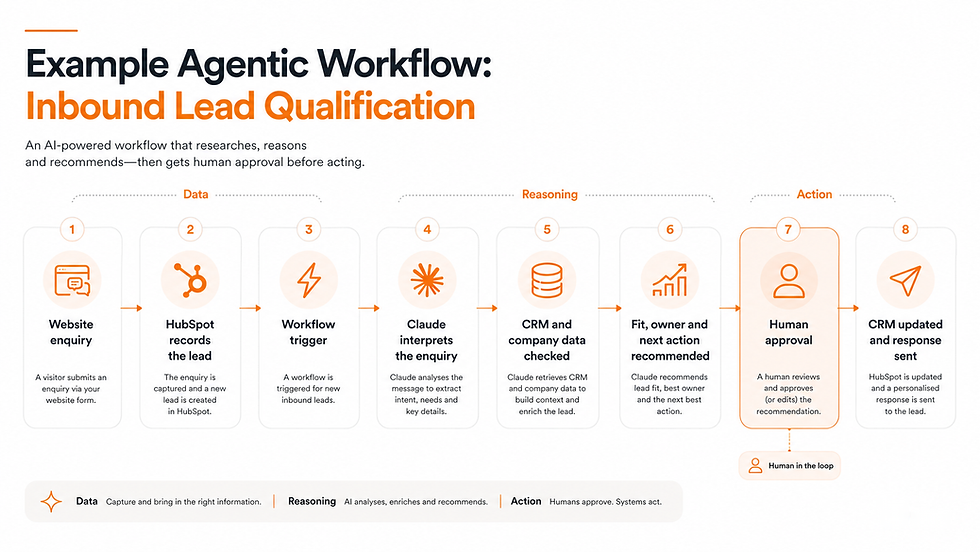
Trigger: A new enquiry enters the CRM.
The agent:
Reviews the enquiry.
Retrieves available company and CRM information.
Assesses likely fit against documented criteria.
Recommends the appropriate service or sales owner.
Suggests urgency and next action.
Drafts a response.
Requests human approval.
Routine routing may eventually be automated.
High-value, uncertain or sensitive opportunities should remain subject to human review.
Campaign launch quality-assurance agent
Before a campaign launches, the agent checks:
Landing-page URL
UTM naming
Conversion tracking
Forms
CRM routing
Audience exclusions
Creative specifications
Messaging consistency
Required approvals
It then produces a:
Pass
Warning
Fail
report with outstanding actions.
Customer and sales insight agent
The workflow reviews:
Sales-call summaries
Form responses
Reasons opportunities were lost
Customer support questions
Reviews
Survey responses
It then identifies:
Recurring objections
Emerging customer needs
Confusing messaging
Product questions
Potential content topics
Improvements to the sales journey
The recommended early-stage ecommerce stack
For an ecommerce business, our stage-two stack would normally be:
Commerce platform: Shopify
Email and lifecycle marketing: Klaviyo
Analytics: GA4
Search: Google Search Console
Behavioural analysis: Microsoft Clarity
Product visibility: Google Merchant Center
Advertising: Google Ads and Meta Ads where relevant
Reporting and AI data: Catchr Starter
AI workspace: Claude Team
Automation: Shopify Flow and Make
Creative: Canva Pro
Klaviyo is designed around B2C customer, product and order data, with native integrations for ecommerce platforms such as Shopify. Its plans scale according to contact numbers and channel usage.
Use it for journeys such as:
Welcome sequences
Browse abandonment
Basket abandonment
Post-purchase communication
Review requests
Repeat-purchase reminders
Win-back campaigns
VIP segments
Product recommendations
Do not launch every possible automated flow simultaneously.
Begin with the journeys most closely connected to revenue and customer experience, measure them and expand from there.
When you have outgrown the repeatable acquisition stack
Move towards stage three when:
Different teams require different views of the customer.
The business has several meaningful acquisition channels.
Sales and marketing disagree about lead quality or attribution.
Reporting depends on substantial manual manipulation.
Lifecycle automation has become conditional and multi-stage.
Duplicate or inconsistent records are affecting activity.
You need to connect marketing with pipeline and revenue.
Website experimentation has become an ongoing programme.
Several agents or automations are acting on shared customer data.
Workflow ownership and governance are becoming difficult to manage.
Stage three: The multichannel growth stack
Who this stack is for
This stage is intended for businesses with:
A dedicated marketing function
Several acquisition channels
Meaningful campaign expenditure
A sales team or established ecommerce operation
Larger contact and customer databases
More complex lifecycle journeys
Increased reporting demands
A growing collection of automated workflows
A need for stronger governance
At this stage, marketing technology becomes operational infrastructure.
Decisions about fields, permissions, integrations and reporting can affect several teams.
CRM and marketing automation: HubSpot Professional
For a growing B2B business, HubSpot Professional would often remain our default recommendation.
The attraction is not simply that it contains more features.
Marketing activity, sales opportunities and customer information can continue to connect to the same underlying CRM.
A Professional-level implementation can support:
More advanced workflows
Lead scoring
Lifecycle automation
Campaign reporting
Segmentation
Sales and marketing handovers
Multiple pipelines
Conversion reporting
More sophisticated permissions
But this is also the point at which HubSpot can become expensive.
Before upgrading, calculate:
The marketing contacts required
The users and paid seats required
Which advanced features will actually be used
Implementation costs
Migration and data-cleaning requirements
Ongoing management
Additional tools HubSpot may replace
Do not buy a higher tier because it appears to represent the next stage of maturity.
Upgrade because particular functionality solves a documented constraint or creates measurable value.
When Salesforce becomes relevant
Salesforce may become appropriate when:
Sales requirements are considerably more complex than marketing requirements.
Several teams depend on detailed CRM processes.
The organisation needs extensive customisation.
Salesforce is already the company-wide system of record.
There is sufficient technical and operational support to manage it.
Do not move from HubSpot to Salesforce simply because Salesforce is perceived as more enterprise.
A poorly implemented Salesforce environment can create far more operational friction than a well-managed HubSpot setup.
Reporting: Looker Studio or Power BI
Native reports inside advertising platforms and CRMs are rarely sufficient at this stage.
You need a reporting layer that can combine information from:
Website analytics
CRM
Advertising
Email
Ecommerce
Sales
Finance
Customer success
Product analytics
Looker Studio remains suitable for many marketing teams.
Power BI may be preferable when:
The wider organisation already uses Microsoft products.
Reporting extends well beyond marketing.
Data modelling is more complex.
Internal analysts already work with Power BI.
The objective is not to create the most visually impressive dashboard.
It is to create a shared and trusted definition of performance.
Marketing-data access: Catchr Growth
Catchr Growth becomes relevant when the business needs more than three connected platforms, operates multiple accounts or wants to move data into BigQuery.
The current Growth plan includes ten platforms and 100 accounts, plus BigQuery integration, API access, personalised fields and data blending. It costs $199 per month when billed annually or $239 monthly.
This can provide a bridge between:
Advertising platforms
Analytics
CRM
Ecommerce
Search
AI assistants
Dashboards
A data warehouse
Catchr is not the only possible data-integration platform.
Its particular relevance here is that the same marketing-data layer can support conventional reporting and conversational analysis through Claude.
Data warehouse: BigQuery when complexity justifies it
Do not introduce a data warehouse simply because growing businesses are expected to have one.
BigQuery or another warehouse becomes useful when:
Data needs to be combined from numerous systems.
Historical data needs to be retained independently.
Reporting transformations have become complex.
Several dashboards require the same cleaned information.
Marketing and commercial reporting need shared definitions.
AI systems need controlled access to structured business data.
Platform-native reporting is no longer sufficient.
Until these problems exist, a warehouse may create more work than value.
SEO, AEO and AI-search monitoring
A growing business with an established organic-search programme should have access to a full SEO platform.
Our usual preference would be Ahrefs for:
Competitor research
Keyword analysis
Backlink analysis
Content-gap identification
Technical auditing
Conventional rank tracking
AI-search visibility
Custom prompt monitoring
Semrush may be preferable for teams that want a wider collection of search, content and competitive-marketing tools in one platform.
A dedicated answer-engine optimisation or AI-visibility platform may become worthwhile where:
AI-generated discovery is strategically important.
You need to track large numbers of prompts.
Several markets or languages must be monitored.
Citation sources need to be analysed.
You need competitor share-of-answer reporting.
AI visibility data needs to enter a warehouse or reporting system.
Do not choose an AEO platform only because its dashboard looks impressive.
Check whether it can:
Export underlying data
Connect to your reporting environment
Integrate with GA4 and Search Console data
Track the markets and models that matter to you
Show the sources being cited
Distinguish branded from non-branded visibility
Connect visibility with website and commercial outcomes
Provide an API, connector or MCP access
For a deeper explanation of AI-search visibility, see Rise’s guide to optimising websites for ChatGPT, Google AI Overviews, Gemini, Perplexity and Claude.
Behavioural analysis and experimentation
Continue using Microsoft Clarity for behavioural insight.
Add a dedicated experimentation platform such as VWO when the business has:
Enough traffic to reach useful conclusions
A repeatable process for generating hypotheses
Implementation support
Agreed conversion metrics
Someone responsible for interpreting results
The ability to act on findings
VWO supports web and feature experimentation, including A/B, multivariate and server-side use cases.
Purchasing an experimentation platform does not create an experimentation culture.
Without sufficient traffic and a disciplined process, it becomes another subscription used for occasional cosmetic changes.
Product analytics for SaaS: PostHog or Mixpanel
A product-led SaaS business needs more than website analytics and CRM data.
A product-analytics platform can help answer:
Which features are being used?
Where do users abandon onboarding?
Which behaviours predict activation?
Which actions correlate with retention?
How does usage differ between segments?
Which accounts may be at risk?
PostHog combines product analytics with capabilities including session replay, feature flags and experiments.
Mixpanel remains a credible alternative for teams primarily focused on behavioural analysis, funnels and product usage.
This is a business-model-specific addition.
A professional-services company does not need product analytics merely because it has reached stage three.
Agent orchestration: Make Teams or n8n
At this stage, automation and agent workflows require stronger governance.
Make remains suitable for many marketing teams, particularly where marketing operations owns the workflows and values visual management.
n8n may be more appropriate when:
Greater technical control is required.
Self-hosting matters.
Developers or technical operators are available.
Workflows require custom code.
Production environments and version control are important.
Human approval needs to be inserted at precise points.
The business wants to control the underlying agent architecture.
n8n recommends using deterministic workflow logic for predictable steps and handing work to an AI agent only where flexible reasoning is necessary.
The more important questions are not Make versus n8n.
They are:
Who owns each workflow?
Where are credentials stored?
What happens when it fails?
How are changes tested?
Which actions require approval?
What data can the agent access?
How are actions recorded?
Who is accountable for the result?
Agentic workflows for the multichannel growth stack
Cross-channel performance agent
The agent monitors:
Spend
Revenue or pipeline
Conversion volume
Cost per acquisition
Lead quality
Landing-page conversion
Customer lifetime value where available
It can identify situations such as:
Paid media looks efficient, but qualified-lead rate has declined.
Revenue has increased while new-customer acquisition has fallen.
One campaign is absorbing spend without producing opportunities.
A conversion-rate problem is affecting several channels simultaneously.
A campaign appears to have deteriorated because tracking has failed.
Budget changes should initially remain recommendations rather than autonomous actions.
Content-decay agent
The agent:
Monitors Search Console and analytics data.
Identifies pages losing clicks, impressions or engagement.
Prioritises them by commercial importance.
Reviews current search intent and competing pages.
Produces an update brief.
Suggests internal-linking opportunities.
Creates a first draft or assigns the work.
This is a more valuable use of AI than simply generating additional articles regardless of demand.
Lifecycle-opportunity agent
The agent examines CRM, email, product or ecommerce behaviour to identify:
Unengaged leads
High-intent prospects
Onboarding problems
Repeat-purchase opportunities
Customers approaching likely churn
Segments responding differently to campaigns
It can enrol people into pre-approved journeys where the criteria are deterministic.
Uncertain, high-value or sensitive cases should be escalated.
CRM quality agent
The agent monitors:
Missing fields
Conflicting lifecycle stages
Duplicate records
Leads without owners
Opportunities without recent activity
Inconsistent source information
Deals stuck unusually long in one stage
Low-risk formatting corrections may be automated.
Record merges and commercially meaningful changes should normally require approval.
Experimentation agent
The agent combines:
Analytics
Session recordings
Customer research
Previous test results
Commercial priorities
It proposes and prioritises test hypotheses, prepares the test brief and helps evaluate results once sufficient evidence exists.
The agent can improve the process.
It should not declare a test winner before the agreed statistical and commercial criteria have been met.
When you have outgrown the multichannel stack
The business may be moving towards stage four when:
Several business units or markets share customer data.
Multiple CRMs or legacy systems need to coexist.
Permissions and data residency have become significant issues.
Marketing, sales, service and product all require a shared customer view.
Numerous agents need access to the same systems.
Auditing agent actions has become essential.
Data transformations are too complex for dashboard-level connectors.
Platform procurement increasingly involves IT, security, legal and data teams.
Integration architecture has become a strategic concern.
Stage four: The complex marketing technology architecture
At this level, “the best marketing tech stack” is no longer a simple list of products.
Two businesses with similar revenue may need very different architectures because of differences in:
Products
Markets
Countries
Sales cycles
Customer types
Data volumes
Regulatory requirements
Existing technology
Acquisitions
Internal expertise
A typical complex B2B architecture might include:
Salesforce or HubSpot Enterprise as the primary CRM
HubSpot, Marketo or another marketing automation platform
BigQuery or Snowflake as a data warehouse
Segment or another customer data platform
Looker or Power BI
Workato, Make, n8n or enterprise integration infrastructure
VWO or Optimizely
A consent-management platform
A secure enterprise AI environment
But the business should no longer select each platform independently.
It needs an architecture covering:
Systems of record
Data ownership
Customer identity
Integration patterns
Permissions
Data retention
Consent
Reporting definitions
AI access
Human approval
Platform ownership
Vendor risk
Workflow monitoring
Incident response
Implementation quality will usually have more effect on performance than the choice between two broadly capable market-leading products.
A governed multi-agent marketing architecture
A mature organisation may eventually use several specialist agents rather than one general marketing agent.
Examples include:
A performance-analysis agent
A paid-media monitoring agent
A content-decay agent
A CRM-quality agent
A lifecycle agent
A customer-research agent
An experimentation agent
An orchestration agent that prioritises findings
Each agent should receive only the tools and data required for its role.
Do not give one general-purpose agent unrestricted access to the entire marketing technology stack.
A governed architecture should include:
Shared context
Approved:
Brand guidance
Product information
Customer definitions
Measurement standards
Policies
Commercial priorities
Controlled data access
Agents should access information through approved systems rather than unstructured copies stored in numerous conversations.
Restricted tools
A reporting agent may need read access to campaign data.
It does not need permission to change advertising budgets.
Human approval
Material actions should have clearly defined approval thresholds.
Logging
The organisation should be able to determine:
Which agent acted
What information it accessed
Which tools it used
What decision it made
What action followed
What the action cost
Evaluation
Agent performance should be assessed against:
Accuracy
Reliability
Time saved
Error rates
Commercial impact
Human correction rates
Customer outcomes
The goal is not to maximise agent autonomy.
It is to create the right balance between speed, flexibility, control and accountability.
Automation or AI agent: which should you use?

Not every automated marketing process needs an agent.
Use conventional automation when the rules are predictable.
Use AI where the process requires interpretation.
Type of task | Best approach |
Always follows the same rules | Standard automation |
Fixed workflow with one generated or classification step | AI-assisted automation |
Requires interpretation and variable tool selection | Supervised AI agent |
Repetitive decision within strict boundaries | Agent with defined limits |
High-risk or strategic decision | Human-led, AI-supported |
Examples:
Adding every new form submission to HubSpot does not require an agent.
Interpreting an unstructured enquiry and deciding how to route it may justify one.
Sending a standard booking confirmation does not require an agent.
Researching a prospect and preparing a contextual response may justify one.
Copying an agreed budget into a report does not require an agent.
Investigating why acquisition performance changed across several systems may justify one.
Agents should be introduced because the work requires reasoning—not because “agentic” is the latest software label.
HubSpot, ActiveCampaign or Klaviyo?
These platforms can appear to overlap, but they serve different operating models.
Choose HubSpot when:
You are primarily B2B or lead-generation focused.
Marketing and sales need to share information.
Pipeline reporting matters.
You want CRM, marketing and sales tools in one environment.
You expect to add service or customer-success processes.
You value breadth and integration.
Choose ActiveCampaign when:
Email and lifecycle automation are central.
Customer journeys depend on behaviour and tags.
The sales process is relatively straightforward.
You are prepared to connect additional platforms.
A broader customer platform would add unnecessary expense.
Choose Klaviyo when:
You operate an ecommerce or B2C business.
Product, order and customer behaviour must drive communication.
Repeat purchase and customer lifetime value are important.
Shopify or another ecommerce platform is central.
You need lifecycle journeys based on shopping behaviour.
None is universally better.
The question is which platform most closely matches how your business attracts, converts and retains customers.
Marketing tech tools you probably do not need yet
A customer data platform
A CDP can be valuable when customer information is fragmented across numerous systems and needs to be unified and activated at scale.
Most early-stage businesses do not have a CDP problem.
They have:
Poorly configured CRM fields
Inconsistent tracking
Duplicate spreadsheets
Missing consent information
Unclear lifecycle stages
Unreliable integrations
Fix those first.
A separate landing-page platform
A dedicated platform can be useful when:
Campaign teams must launch pages without changing the main website.
Testing is frequent.
The CMS creates genuine restrictions.
Paid campaigns require numerous tailored experiences.
You probably do not need one when the existing website platform can create appropriate landing pages quickly.
Enterprise social-media software
Sophisticated social scheduling, monitoring and approval functionality is rarely the immediate constraint for a small business.
Before purchasing it, establish:
Which social channels matter
What you will publish
Who will create it
How frequently you will post
Which business outcome it supports
Scheduling an inconsistent social strategy more efficiently does not make it effective.
Advanced attribution
You do not need an advanced attribution platform when basic source tracking is incomplete.
Start with:
Consistent UTMs
GA4
CRM source fields
Advertising conversion tracking
Offline conversion uploads
Reliable revenue records
Advanced attribution built on poor data produces a more sophisticated-looking version of the wrong answer.
A collection of specialist AI tools
Specialist AI tools can be excellent.
But purchasing separate platforms for content, email, social media, meeting notes, advertising, research and reporting can quickly recreate the fragmented stack AI was supposed to simplify.
Begin with:
A broad AI workspace
Existing platform-native AI
An orchestration platform
A small number of high-value workflows
Add specialist tools only when they materially outperform the broader environment within an important and repeatable process.
How much should a marketing tech stack cost?
There is no universal budget because pricing can depend on:
Users
Marketing contacts
Email volume
Website traffic
Data volume
Workflow usage
AI-model usage
Integrations
Support
Implementation
Contract length
As a broad guide, excluding advertising spend, transaction fees and implementation:
Founder-led business
Approximately £50–£250 per month
Prioritise essential infrastructure, free tools and one capable AI workspace.
Early-stage business
Approximately £250–£1,000 per month
This may include a paid CRM, SEO software, marketing-data access, team AI and automation.
Growing multichannel business
Approximately £1,000–£5,000+ per month
Costs rise as contact databases, users, reporting, experimentation and automation become more complex.
Complex organisation
Quote-based and potentially substantially higher
Implementation, integration and internal management costs may exceed the headline subscription fees.
The important calculation is total cost of ownership:
Subscription
Implementation
Migration
Training
Integration
Management
External support
AI-model usage
Time spent correcting problems
Cost of being unable to access or move data
A cheap platform that creates extensive manual work may be more expensive than a higher-priced tool that removes it.
How to build a martech stack from scratch
1. Map the customer journey
Start with how someone:
Discovers the business
Evaluates the offer
Enquires or purchases
Becomes a successful customer
Remains a customer
Recommends the business
Rise’s guide to using the marketing funnel and customer journey together explains how to map these stages and identify friction.
2. Identify the required capabilities
Define what the business needs to be able to do before naming products.
For example:
Publish website content
Capture enquiries
Record prospects
Send lifecycle emails
Report on acquisition
Understand website behaviour
Route leads
Manage consent
Analyse performance
Automate follow-up
3. Select the system of record
Decide where authoritative customer and commercial information will live.
For most B2B businesses, this is the CRM.
For ecommerce, it may initially be the commerce platform.

4. Add the minimum acquisition and experience tools
Add tools only for channels and customer journeys you genuinely plan to operate.
You do not need social-media management software when social media is not a meaningful channel.
5. Build the measurement layer
Agree:
Conversions
Funnel stages
Source definitions
Reporting metrics
Commercial outcomes
6. Connect predictable processes
Use conventional automation for repeated, rules-based work.
7. Add AI where interpretation is required
Introduce AI assistants and agents into processes where they can:
Understand unstructured information
Investigate data
Recommend an action
Select between approved tools
Produce a contextual response
8. Define human approval
Identify actions the system may complete automatically and those that require review.
9. Document ownership
Every important platform and workflow should have an owner.
10. Review and simplify regularly
Remove technology that:
Duplicates another tool
Is rarely used
Does not integrate
Cannot demonstrate value
Creates unnecessary risk
Has been absorbed into another platform
How to audit your existing marketing technology stack

Create an inventory containing:
Tool
Purpose
Primary owner
Users
Cost
Contract renewal date
Data stored
Integrations
Key workflows
AI or agent access
Usage level
Business outcome supported
Replacement difficulty
Security considerations
For each tool, ask:
Does it have a defined purpose?
Someone should be able to explain clearly why it exists.
Is it being used?
Logins alone are not enough. Is it supporting meaningful work?
Is another tool duplicating it?
Duplication is common across:
Forms
Email
Analytics
Reporting
Social scheduling
AI
Automation
Is the data accurate?
A heavily used platform containing unreliable information may be more dangerous than an unused one.
Is it connected to the rest of the stack?
Manual exports may be acceptable when infrequent.
They become a problem when the process is repeated or affects important decisions.
Can its value be explained?
Not every platform needs to generate revenue directly.
It should still save time, reduce risk, improve customer experience or provide useful information.
What would happen if it were removed?
This is often the most revealing question.
If the answer is “probably nothing”, you may have found a subscription to cancel.
How to know when to replace a martech tool
Do not replace software simply because something newer has launched.
Consider replacement when:
It cannot support a critical process.
Important integrations are unavailable.
Reporting cannot be trusted.
The team avoids using it.
Data cannot be exported properly.
Workarounds have become more complex than the platform.
Costs have risen without corresponding value.
The vendor is no longer investing in it.
The business model has changed.
Another tool already provides the capability.
Security or compliance requirements cannot be met.
Every migration has a cost.
Before replacing a platform, determine whether the real problem is:
Poor implementation
Incomplete training
Bad data
Lack of ownership
An unnecessarily complex process
Unrealistic expectations
Buying a new CRM will not fix a team that does not update opportunities.
How Rise makes marketing technology recommendations
We do not believe the platform with the longest feature list is automatically the best choice.
Our recommendations consider:
Business stage
Business model
Customer journey
Growth strategy
Available budget
Internal expertise
Required integrations
Data ownership
Ease of implementation
Ongoing management
Scalability
Total cost of ownership
Opportunity for automation
Suitability for agentic workflows
Risk of unnecessary complexity
The objective is not to create the most impressive martech diagram.
It is to create a functioning marketing system.
That can involve implementing a new platform.
It can also mean:
Simplifying an existing setup
Improving tracking
Cleaning CRM data
Connecting systems properly
Automating repetitive work
Creating a supervised AI agent
Using more of the technology the business already pays for
Rise works as a transparent collective of UK-based channel specialists. The people recommending and implementing the stack are the people who understand how it will be used across strategy, CRM, analytics, paid media, SEO, content, CRO and automation.
For help auditing, selecting or connecting your marketing technology, see our AI marketing consulting, strategy and automation service.
How we keep this guide current
Marketing technology changes too quickly for a tool-specific article to remain accurate indefinitely.
We therefore treat these recommendations as a maintained guide rather than a permanent ranking.
During each review, we assess:
Whether each recommended platform still exists
Whether it is still actively developed
Material pricing and packaging changes
Important new functionality
Integration changes
Whether AI has removed the need for another tool
Whether we would still recommend it to a client
Whether a stronger alternative has emerged
Whether the suggested upgrade points remain appropriate
The article’s review date is changed only after a meaningful assessment—not simply to make old content appear new.
Update history
July 2026: Article fully rewritten. Introduced stage-based recommended stacks, business-model alternatives, AI-search tools, agentic workflows and martech-audit guidance.
Frequently asked questions
What is the best marketing tech stack?
There is no single best stack for every organisation.
For a founder-led B2B business, a strong starting point would be Wix, HubSpot Free, GA4, Google Search Console, Microsoft Clarity, Calendly, Ahrefs Free, Claude Pro and selective Make automations.
A growing ecommerce business would normally be better served by a stack built around Shopify and Klaviyo.
The best stack is the smallest integrated collection of technology capable of supporting the business’s current growth model and next realistic stage.
What tools should be included in a startup marketing tech stack?
A startup generally needs:
A website or ecommerce platform
CRM or customer database
Lead-capture forms
Analytics
Search-performance data
Email capability
Scheduling where relevant
Behavioural analytics
Basic automation
Creative tools
A secure AI workspace
More advanced technology should be added only when a specific requirement justifies it.
What is a modern marketing stack?
A modern marketing stack includes more than individual SaaS tools.
It combines:
Systems of record
Customer-facing platforms
Measurement and context
Automation
AI assistants and agents
Human governance
The stack should be designed around how information and work move between these layers.
How do I build a martech stack from scratch?
Start by mapping how someone becomes and remains a customer.
Then identify the technology required to:
Attract them
Capture their details
Store their information
Follow up
Convert them
Retain them
Measure what happened
Select the central system of record first, then build the remaining stack around it.
Is HubSpot the best CRM for startups?
HubSpot is a strong default for many B2B and lead-generation startups because its free and entry-level products combine CRM with marketing and sales functionality.
It is not automatically the best choice.
ActiveCampaign may be more appropriate when email automation is the priority. Klaviyo is generally better suited to ecommerce. Businesses should also understand HubSpot’s future contact, seat and upgrade costs.
What is the difference between marketing automation and an AI agent?
Marketing automation follows predefined rules.
An AI agent can interpret information, select from approved tools and adapt its response to the situation.
For example, automatically adding a form submission to a CRM is automation.
Analysing an unstructured enquiry, researching the company and recommending how it should be handled is a potential agentic workflow.
Do I need Catchr to use Claude for marketing analysis?
No.
Claude can analyse uploaded spreadsheets and information from other connected systems.
Catchr becomes useful when you want Claude to query normalised, current data from several marketing platforms without repeatedly preparing exports.
How should I choose an AEO platform that integrates with my existing marketing tech stack?
Assess:
Which AI platforms and markets it monitors
Prompt-tracking capacity
Citation and source reporting
Competitor visibility
Data export options
API, connector or MCP access
Integration with GA4 and Search Console
Ability to connect visibility with website and commercial outcomes
An attractive standalone dashboard is not enough. The information should fit into your wider reporting and decision-making processes.
How often should a marketing technology stack be reviewed?
Conduct a light review each quarter and a substantial audit at least annually.
Review sooner after:
A major strategy change
Rapid team growth
A funding round
Entry into a new market
A change in business model
An acquisition
Significant pricing changes
Repeated data or integration failures
Can Rise help us build or improve our marketing technology stack?
Yes.
Rise can:
Audit current platforms
Identify gaps and duplication
Improve tracking
Recommend appropriate tools
Design integrations
Implement automations
Develop supervised AI and agentic workflows
Ensure the technology supports the wider growth strategy
Our collective structure means the stack can be assessed by the specialists who will actually use it—not simply by a software reseller or implementation team.
Build the stack around your growth strategy—not the other way around
The number of available marketing technologies can make choosing a stack feel impossibly complicated.
But most businesses do not need to compare 15,505 products.
They need to make a relatively small number of good decisions:
Where customer information should live
How leads and customers will be captured
How systems will connect
What needs to be measured
Which predictable tasks should be automated
Where AI can apply useful interpretation
Which decisions require human approval
What the team can realistically manage
What technology is genuinely required at the current stage
Start with the simplest stack capable of doing those things well.
Add complexity only when the value is clear.
The best marketing tech stack is not the one with the most logos.
It is the one that quietly and reliably helps your business grow.


